
Quelle
Wenn man den Text nicht genau liest, dann klappt es auch nicht.
Das A und O ist die Kontrastspannung. Die sind 8,2V am besten mit einen Poti 10K an einer Blockbatterie anlegen.
Nächste Baustelle. Aus 5V macht man 8V für das Display. Eben bei Reichelt bestellt.

The output voltage typical : Wide input voltage 3.5Vdc to 40Vdc.
Component list
- 2.2k 1/4W resistor
- 0.1uF capacitor
- 0.33uF capacitor
- 680uF 50V electrolytic capacitor
- 1N5822 high speed schottky diode (3A)
- wire coil inductor, 100uH
- “for LM2577-adj IC” 20k multi-turn variable resistor, set to ratio to R2=2k, R1=18k for voltage
Alternative für wenig Euros, hoffe ich finde noch welche:
http://www.sprut.de/electronic/switch/smallup/smallup.html
In jedem Elektronikkatalog gibt es DC/DC-Wandler. Das sind kleine schwarze Module, die wie zu groß geratene Schaltkreise aussehen, und direkt auf Platinen gelötet werden. Leider sind die nicht gerade billig. So zwischen 10 € und 20 € muss man schon anlegen, um ein Modul mit 1W .. 3W Ausgangsleistung zu erwerben. 1,8-Watt-Module, die 5V DC in 9V DC wandeln, gibt es aber auch fast umsonst. Sie sind nämlich auf alten Netzwerkkarten mit BNC-Anschluss verbaut. Solche Karten wurden in großer Zahl ausgesondert, da sie oft nicht 100-MBit-fähig sind.
Auf dem Foto sieht man eine solche Karte. Der DC/DC-Wandler ist die schwarze Box in der oberen linken Ecke.
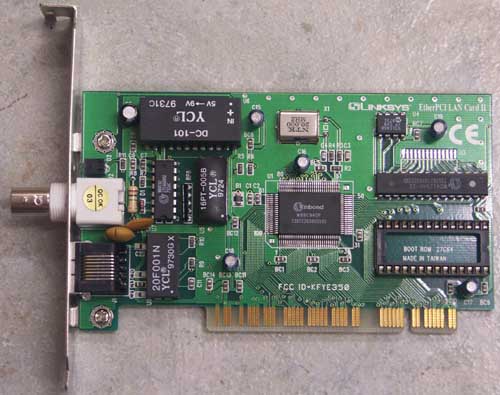
http://myweb.tiscali.co.uk/gm8bjf/dc-101.pdf


Habe eine Karte gefunden. Mit der Heissliftpistole fällt das Teil regelrecht auf den Boden.
Habe mal den YCL DC-101 direkt mit dem Display verbunden. Die neun Volt sind OK. Etwas viel Kontrast. Mit den passenden Widerstand bekommen wir das hin.


wenn ich einen Poti mit 5K dazwischen schalte ist das Ergebnis sehr erfreulich


Jetzt haben wir das Display autark am Raspberry, wenn auch der Konverter etwas klobig ist. Zum Trost sind die DC/DC Wandler ggf. auf dem Elektronik Schrottplatz zu finden.
Aber eben zum berechnen...
Du musst 3 Werte wissen.
1. Ausgangsspannung, also in diesem Fall 12 Volt
2. Gewünschte Spannung, bei dir 9 Volt
3. Leistungsaufnahme in Ampere
Zuerst rechnet man aus um wie viel die Spannung gesenkt werden soll. Also 12V - 9V =3V (UV = U - UF)
Danach die Differenz (hier 3Volt) durch die Leistungsaufnahme in Ampere teilen, als Beispiel mal 0,09 Ampere beim Noctua NF-P12.
3/0,09=33,3~
Für diesen Lüfter bräuchte man also einen Widerstand von 33Ω um ihn auf 12 Volt laufen zu lassen
Spielerei. Shellsript zeit.sh unten im Anhang
Anhang
Hier der Quelltext nochmal.
pi@raspberrypi ~/display $ cat test.py
#!/usr/bin/python
#
#';; LCD-Routinen fuer M50530 ;;
#';; ======================== ;;
#';; ;;
#';; Titel : 4 Bit LCD M50530 ;;
#';; Autor : Arno Schweissinger ;;
#';; Datum : 14.12.2013 ;;
#';; Code : Python 3 ;;
#';; MC : Raspberry Pi ;;
#';; LCD : M505300 24x8 LCD ;;
#';; Stromversorgung: LCD 5V & 8,2V ;;
#';; ;;
#';; 4bit-Interface M50530 ;;
#';; ;;
#';;LCD Signsl PasPi GPIO ;;
#';;Pin Pin ;;
#';; 6 D4 Pin 22 GPIO25 ;;
#';; 7 D5 Pin 18 GPIO24 ;;
#';; 8 D6 Pin 16 GPIO23 ;;
#';; 9 D7 Pin 12 GPIO18 ;;
#';; 10 EX Pin 15 GPIO22 ;;
#';; 11 RW auf GND Pin 06 ;;
#';; 12 OC2 Pin 24 GPIO8 ;;
#';; 13 OC1 Pin 26 GPIO7 ;;
#';; 14 Kontrast 8V aus einer 9V Batterie ;;
#';; 15 5V Pin 02 ;;
#';; 16 GND Pin 06 ;;
import time
import sys
import RPi.GPIO as GPIO
from time import gmtime, strftime
from datetime import datetime
# Zuordnung der GPIO Pins (ggf. anpassen)
LCD_OC1 = 7 # Pin 26
LCD_OC2 = 8 # Pin 24
LCD_EX = 22 # Pin 15
LCD_DATA4 = 25 # Pin 22
LCD_DATA5 = 24 # Pin 18
LCD_DATA6 = 23 # Pin 16
LCD_DATA7 = 18 # Pin 12
LCD_EX_wait = 0.0001
Line = [0x00,0x30,0x60,0x90,0x18,0x48,0x78,0xa8]
Zeile = ["","","","","","","","",""]
#'-------------------------
#' Begin Hauptprogramm
#'-------------------------
def main():
# Main program block
Lcd_init()
# Variablen aus der Programmübergabe
for i in range(len(sys.argv)):
if i == 0:
print "Funktionsname: %s" % sys.argv[0]
else:
print "%d. Argument: %s" % (i,sys.argv[i])
Zeile[i]=(sys.argv[i])
print (i)
#while True:
Lcd_cls()
Lcd_xy(1,1)
Lcd_str(Zeile[1])
Lcd_xy(1,2)
Lcd_str(Zeile[2])
Lcd_xy(1,3)
Lcd_str(Zeile[3])
Lcd_xy(1,4)
Lcd_str(Zeile[4])
Lcd_xy(1,5)
Lcd_str(Zeile[5])
Lcd_xy(1,6)
Lcd_str(Zeile[6])
Lcd_xy(1,7)
Lcd_str(Zeile[7])
Lcd_xy(1,7)
Lcd_str(Zeile[8])
time.sleep(1)
def Lcd_init():
GPIO.setwarnings(False)
GPIO.setmode(GPIO.BCM)
GPIO.setup(LCD_OC1 , GPIO.OUT)
GPIO.setup(LCD_OC2 , GPIO.OUT)
GPIO.setup(LCD_EX , GPIO.OUT)
GPIO.setup(LCD_DATA4 , GPIO.OUT)
GPIO.setup(LCD_DATA5 , GPIO.OUT)
GPIO.setup(LCD_DATA6 , GPIO.OUT)
GPIO.setup(LCD_DATA7 , GPIO.OUT)
#Lcd_parameter = &B1101 1010 #'set function mode (SF) 0b11011010
Lcd_command(0xDA) #'4bit-Modus einstellen 11 -4/8bit-FONT-2xDUTY-2xRAM
#'set entry mode (SE) 0b01010000
Lcd_command(0x50) #'Cursor selbst setzen
#'set display mode (SD) 0b00110011
Lcd_command(0x33) # 'Display ein, Cursor nicht anzeigen
Lcd_cls()
def Lcd_cls():
Lcd_command(0x01)
time.sleep(0.001)
def Lcd_str(message):
for i in range(len(message)):
Lcd_byte(ord(message[i]))
def Lcd_byte(ch):
GPIO.output(LCD_OC1, False)
GPIO.output(LCD_OC2, True)
Lcd_out(ch)
def Lcd_command(command):
GPIO.output(LCD_OC1, False)
GPIO.output(LCD_OC2, False)
Lcd_out(command)
def Lcd_xy(x,y):
CurPos = Line[y-1] + x-1
GPIO.output(LCD_OC1, True)
GPIO.output(LCD_OC2, True)
Lcd_out(CurPos)
def Lcd_out(command):
# high nibble
GPIO.output(LCD_DATA4, False)
GPIO.output(LCD_DATA5, False)
GPIO.output(LCD_DATA6, False)
GPIO.output(LCD_DATA7, False)
if command&0x80==0x80:
GPIO.output(LCD_DATA7, True)
if command&0x40==0x40:
GPIO.output(LCD_DATA6, True)
if command&0x20==0x20:
GPIO.output(LCD_DATA5, True)
if command&0x10==0x10:
GPIO.output(LCD_DATA4, True)
Lcd_Enable()
# low nibble
GPIO.output(LCD_DATA4, False)
GPIO.output(LCD_DATA5, False)
GPIO.output(LCD_DATA6, False)
GPIO.output(LCD_DATA7, False)
if command&0x08==0x08:
GPIO.output(LCD_DATA7, True)
if command&0x04==0x04:
GPIO.output(LCD_DATA6, True)
if command&0x02==0x02:
GPIO.output(LCD_DATA5, True)
if command&0x01==0x01:
GPIO.output(LCD_DATA4, True)
Lcd_Enable()
def Lcd_Enable():
GPIO.output(LCD_EX, True)
time.sleep(LCD_EX_wait)
GPIO.output(LCD_EX, False)
time.sleep(LCD_EX_wait)
if __name__ == '__main__':
main()
pi@raspberrypi ~ $ cat zeit.sh
#!/bin/bash
datum=$(date +%d"."%m"."%Y)
zeit=$(date +%H":"%M)
hour=$(date +%H)
min=$(date +%M)
if [ $hour = 0 ]
then th=" null Uhr "
if [ $min -ge 25 ]; then th="Eins";fi
fi
if [ $hour = 1 ]
then th=" eins "
if [ $min -ge 25 ]; then th="Zwei";fi
fi
if [ $hour = 3 ]
then th=" drei "
if [ $min -ge 25 ]; then th="Vier";fi
fi
if [ $hour = 9 ]
then th=" neun "
if [ $min -ge 25 ]; then th="Zehn";fi
fi
if [ $hour = 10 ]
then th=" Zehn "
if [ $min -ge 25 ]; then th="Elf";fi
fi
if [ $hour = 11 ]
then th=" Elf "
if [ $min -ge 25 ]; then th="Zwoelf";fi
fi
if [ $hour = 12 ]
then th=" Zwoelf"
if [ $min -ge 25 ]; then th="Dreizehn";fi
fi
if [ $hour = 13 ]
then th=" Dreizehn Uhr "
if [ $min -ge 25 ]; then th="Viezehn";fi
fi
if [ $hour = 14 ]
then th=" Zwei"
if [ $min -ge 25 ]; then th="Drei";fi
fi
if [ $hour = 15 ]
then th=" Drei"
if [ $min -ge 25 ]; then th="Vier";fi
fi
if [ $hour = 16 ]
then th=" Vier"
if [ $min -ge 25 ]; then th="Fuenf";fi
fi
if [ $hour = 17 ]
then th=" Fuenf "
if [ $min -ge 25 ]; then th="Sechs";fi
fi
if [ $hour = 18 ]
then th="Sechs"
if [ $min -ge 25 ]; then th="Sieben";fi
fi
if [ $hour = 19 ]
then th="Sieben"
if [ $min -ge 25 ]; then th="Acht";fi
fi
if [ $hour = 20 ]
then th="Acht"
if [ $min -ge 25 ]; then th="Neun";fi
fi
if [ $hour = 21 ]
then th="Neun"
if [ $min -ge 25 ]; then th="Zehn";fi
fi
if [ $hour = 22 ]
then th="Zehn"
if [ $min -ge 25 ]; then th="Elf";fi
fi
if [ $hour = 23 ]
then th="Elf"
if [ $min -ge 25 ]; then th="Zwoelf";fi
fi
if [ $min -ge 0 ]; then te="es ist Punkt "; fi
if [ $min -ge 5 ]; then te="es ist fuenf Minuten nach ";fi
if [ $min -ge 10 ]; then te="es ist zehn Minuten nach ";fi
if [ $min -ge 15 ]; then te="es ist viertel nach ";fi
if [ $min -ge 20 ]; then te="es ist zwanzig nach ";fi
if [ $min -ge 25 ]; then te="es ist fuenf vor halb ";fi
if [ $min -ge 30 ]; then te="es ist halb ";fi
if [ $min -ge 35 ]; then te="es ist fuenf nach halb ";fi
if [ $min -ge 40 ]; then te="es ist zwanzig vor ";fi
if [ $min -ge 45 ]; then te="es ist viertel vor ";fi
if [ $min -ge 50 ]; then te="es ist zehn vor ";fi
if [ $min -ge 55 ]; then te="es ist fuenf vor ";fi
echo $te $th
test=$te$th
echo $test
sudo python /home/pi/test.py $test " " $datum"-"$zeit
**********************************************************************************
pi@raspberrypi ~/ram $ cat m50530lcd.py
#!/usr/bin/python
#
#';; LCD-Routinen fuer M50530 ;;
#';; ======================== ;;
#';; ;;
#';; Titel : 4 Bit LCD M50530 ;;
#';; Autor : Arno Schweissinger ;;
#';; Datum : 14.12.2013 ;;
#';; Code : Python 3 ;;
#';; MC : Raspberry Pi ;;
#';; LCD : M505300 24x8 LCD ;;
#';; Stromversorgung: LCD 5V & 8,2V ;;
#';; ;;
#';; 4bit-Interface M50530 ;;
#';; ;;
#';;LCD Signsl PasPi GPIO ;;
#';;Pin Pin ;;
#';; 6 D4 Pin 22 GPIO25 ;;
#';; 7 D5 Pin 18 GPIO24 ;;
#';; 8 D6 Pin 16 GPIO23 ;;
#';; 9 D7 Pin 12 GPIO18 ;;
#';; 10 EX Pin 15 GPIO22 ;;
#';; 11 RW auf GND Pin 06 ;;
#';; 12 OC2 Pin 24 GPIO8 ;;
#';; 13 OC1 Pin 26 GPIO7 ;;
#';; 14 Kontrast 8V aus einer 9V Batterie ;;
#';; 15 5V Pin 02 ;;
#';; 16 GND Pin 06 ;;
# Mehrere Zeilen ausgeben siehe Hauptprogramm
import time
import sys
import RPi.GPIO as GPIO
from time import gmtime, strftime
from datetime import datetime
# Zuordnung der GPIO Pins (ggf. anpassen)
LCD_OC1 = 7 # Pin 26
LCD_OC2 = 8 # Pin 24
LCD_EX = 22 # Pin 15
LCD_DATA4 = 25 # Pin 22
LCD_DATA5 = 24 # Pin 18
LCD_DATA6 = 23 # Pin 16
LCD_DATA7 = 18 # Pin 12
LCD_EX_wait = 0.0001
Line = [0x00,0x30,0x60,0x90,0x18,0x48,0x78,0xa8]
Zeile = ["","","","","","","","","","","","","","","","",""]
#'-------------------------
#' Begin Hauptprogramm
#'-------------------------
def main():
# Main program block
Lcd_init()
Lcd_cls()
for i in range(len(sys.argv)):
if i == 0:
print "Funktionsname: %s" % sys.argv[0]
else:
print "%d. Argument: %s" % (i,sys.argv[i])
Zeile[i]=(sys.argv[i])
#print (i)
# while True: # Endlosschleife
# sys.exit() # Programm beenden
z1y=int(Zeile[1])
z1x=int(Zeile[2])
Lcd_xy(z1x,z1y)
Lcd_str(Zeile[3])
Lcd_command(0x33)
print (i)
# weitere Zeilen Anzeigen
if i == 6:
z2y=int(Zeile[4])
z2x=int(Zeile[5])
Lcd_xy(z2x,z2y)
Lcd_str(Zeile[6])
if i == 9:
z2y=int(Zeile[4])
z2x=int(Zeile[5])
Lcd_xy(z2x,z2y)
Lcd_str(Zeile[6])
z3y=int(Zeile[7])
z3x=int(Zeile[8])
Lcd_xy(z3x,z3y)
Lcd_str(Zeile[9])
if i == 12:
z2y=int(Zeile[4])
z2x=int(Zeile[5])
Lcd_xy(z2x,z2y)
Lcd_str(Zeile[6])
z3y=int(Zeile[7])
z3x=int(Zeile[8])
Lcd_xy(z3x,z3y)
Lcd_str(Zeile[9])
z4y=int(Zeile[10])
z4x=int(Zeile[11])
Lcd_xy(z4x,z4y)
Lcd_str(Zeile[12])
def Lcd_init():
GPIO.setwarnings(False)
GPIO.setmode(GPIO.BCM)
GPIO.setup(LCD_OC1 , GPIO.OUT)
GPIO.setup(LCD_OC2 , GPIO.OUT)
GPIO.setup(LCD_EX , GPIO.OUT)
GPIO.setup(LCD_DATA4 , GPIO.OUT)
GPIO.setup(LCD_DATA5 , GPIO.OUT)
GPIO.setup(LCD_DATA6 , GPIO.OUT)
GPIO.setup(LCD_DATA7 , GPIO.OUT)
#Lcd_parameter = &B1101 1010 #'set function mode (SF) 0b11011010
Lcd_command(0xDA) #'4bit-Modus einstellen 11 -4/8bit-FONT-2xDUTY-2xRAM
#'set entry mode (SE) 0b01010000
Lcd_command(0x50) #'Cursor selbst setzen
#'set display mode (SD) 0b00110011
Lcd_command(0x33) #'Display ein, Cursor nicht anzeigen
Lcd_cls()
def Lcd_cls():
Lcd_command(0x01)
time.sleep(0.001)
def Lcd_str(message):
for i in range(len(message)):
Lcd_byte(ord(message[i]))
def Lcd_byte(ch):
GPIO.output(LCD_OC1, False)
GPIO.output(LCD_OC2, True)
Lcd_out(ch)
def Lcd_command(command):
GPIO.output(LCD_OC1, False)
GPIO.output(LCD_OC2, False)
Lcd_out(command)
def Lcd_xy(x,y):
CurPos = Line[y-1] + x-1
GPIO.output(LCD_OC1, True)
GPIO.output(LCD_OC2, True)
Lcd_out(CurPos)
def Lcd_out(command):
# high nibble
GPIO.output(LCD_DATA4, False)
GPIO.output(LCD_DATA5, False)
GPIO.output(LCD_DATA6, False)
GPIO.output(LCD_DATA7, False)
if command&0x80==0x80:
GPIO.output(LCD_DATA7, True)
if command&0x40==0x40:
GPIO.output(LCD_DATA6, True)
if command&0x20==0x20:
GPIO.output(LCD_DATA5, True)
if command&0x10==0x10:
GPIO.output(LCD_DATA4, True)
Lcd_Enable()
# low nibble
GPIO.output(LCD_DATA4, False)
GPIO.output(LCD_DATA5, False)
GPIO.output(LCD_DATA6, False)
GPIO.output(LCD_DATA7, False)
if command&0x08==0x08:
GPIO.output(LCD_DATA7, True)
if command&0x04==0x04:
GPIO.output(LCD_DATA6, True)
if command&0x02==0x02:
GPIO.output(LCD_DATA5, True)
if command&0x01==0x01:
GPIO.output(LCD_DATA4, True)
Lcd_Enable()
def Lcd_Enable():
GPIO.output(LCD_EX, True)
time.sleep(LCD_EX_wait)
GPIO.output(LCD_EX, False)
time.sleep(LCD_EX_wait)
if __name__ == '__main__':
main()
Literatur:
https://ssl.bulix.org/projects/lcd4linux/wiki/M50530
http://www.frickelfritze.de/raspberry-m50530/index.html


